
Templates › Stock Inventory
Stock Inventory Excel Template
Know what is in stock and what to order. Closing stock is calculated and the sheet marks every item that needs a reorder.
⬇ Download free (.xlsx)Free · No sign-up · 17 KB · Works in Excel and Google Sheets
See it filled with data
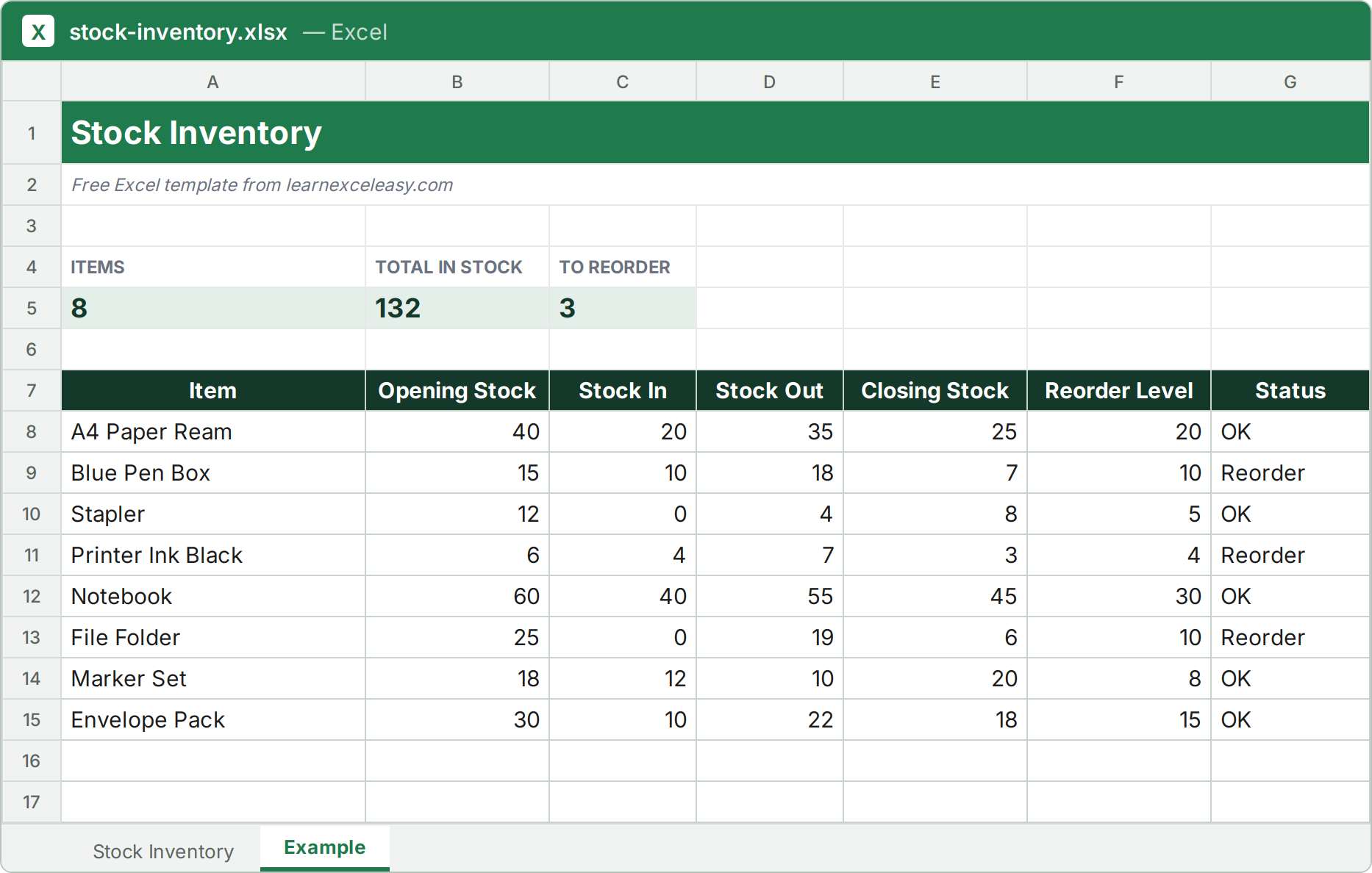
The file has two sheets: a blank one for your own data, and this filled Example so you can see how it works.
What is inside
- Closing Stock = Opening + In − Out
- Status turns to Reorder when stock reaches your level
- Count of items to reorder on top
How to use it
- List every item with its opening stock.
- Add Stock In and Stock Out during the month.
- Set a Reorder Level for each item.
- Order everything marked Reorder.
Formulas used: IF SUM COUNTA COUNTIF
⬇ Download the Stock Inventory template
More free templates
InvoiceQuotationPayment TrackerExpense TrackerMonthly BudgetSales TrackerSalary SheetAttendance SheetTask TrackerLead TrackerLoan EMI Calculator
